



Analyzing Students & Classrooms

Your Live Data
Data Makes the Difference
This page displays a quick glance at your overall analytics. You can also use this page to easily check on a Course, Classroom or Student. When you're ready, you can use the tabs below to drill down into the details of everything that you and your students are doing.
Your "Classrooms" represent the different groups of students, or the different types of efforts that you created specific "Classrooms" for. Take a moment to review the data.
Your "Courses" generate valuable insights into what your community is interested in and how they engage with your efforts. You can also combine Classrooms with different Course offerings to uncover what your community is interested in, how they want to engage with it and what incentives may increase Course Completion Rates.
Your "Student Analytics" help you drill down into behaviors exhibited by your students, revealing and how they interact with your Courses and Campaigns.
Your "Quiz Results" are more than just numbers. Here again, you can combine the data with Course and Campaign filtering, to see which segments of your community are your Highly-Engaged Core, and which segments may need a little more creativity
Your Live Data
The Power of Analytics at Your Fingertips
In one real-life example, one of our partners increased their community engagement by 8,000% in one week. They offered the same lesson to the same audience, in two different ways. The results were astonishing. That's what analytics will do for you.
In the above example, the Organization created a "Classroom" here. They put one course in the classroom and advertised it to their audience over a general email. 48 hours later, only 3 people had viewed the lesson.
They then created "Classroom B". They offered the same course and assigned it an "Organization Code". This time they pushed the course out through their school's Student / Parent Portal AND they offered a homework pass for any student whose parents completed the lesson within 24 hours. HUNDREDS of parents completed the lesson!
Our tools made that possible. We give you some great content and conversation starters on the topics that matter. We give you the ability to offer it in a convenient and flexible way AND we give you the ability to both track and reward your student's engagement.
But beyond that, our tools give you the ability to test hundreds of variables simultaneously, and quickly dial in on exactly what gets results in your community. Change the Lesson, change the Advertising, change the Incentives, change the Deadlines etc..
The reality of today, is that your efforts will not get results unless you can seize the engagement and reward the follow-through of your audience. Analytics give you the power to determine exactly what works for you and your community.
Using Organization Codes

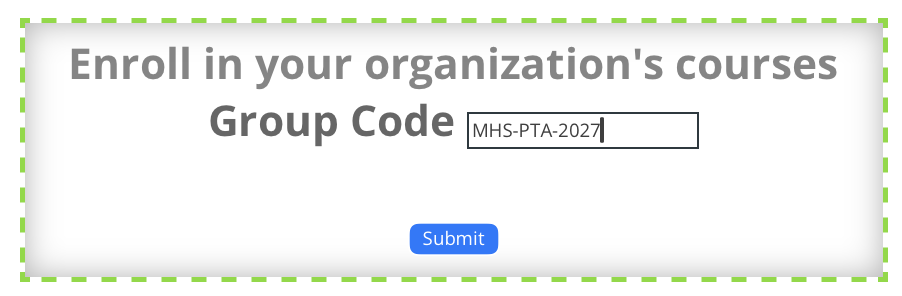
(Example Code: "MHS-PTA-2027")
When you offer a prospective student one of your Organization Codes, you give them the ability to register and begin taking your courses in less than 15 seconds flat; and it's completely FREE for them.
As soon as they use your code, that student will instantly be:
-
- Registered With Your Organization
- Organized Into Their Campaign / Classroom
- Enrolled In Your Courses
- Displayed On Your Student Analytics Dashboard
Organization Codes provide you with ENLESS VERSATILITY. You can create an unlimited number of codes and use them in very powerful ways. You can turn them on, turn them off, set limits on who can use them, set dates for auto-expiration and much more.
It's All So Easy!
Your students simply enter the code into the box on their profile page, and everything happens instantly. Students can redeem an unlimited number of Organization Codes. So the same student can use one code to be instantly organized into the "Class of 2027" macro student group, and use a second code to also be organized into the "Health One: 3rd Period" group. They will now be organized with the "Class of 2027" cohort, but can be managed and monitored on a classroom level by the teacher or guidance counselor of "Health One: 3rd Period". At the end of the year, the student can easily be removed from the "Health One; 3rd Period" group and reassigned to a new teacher. All their student records go with them, and they stay attached to the "Class of 2027" macro student group.
In another example, an Organization may choose to create temporary groups based upon class, club or team assignments, and run a contest for course completion. It becomes easy to compare the group's analytics and reward the winner. Another organization may simply use one Organization Code for an "Email Campaign", and another Organization Code for a "Social Media Campaign". They can then compare which effort resulted in a higher conversion rate. Or they can conduct the same comparison to determine what courses stimulate more interest in their community. By simply creating one Organization Code for the "Safer Social Media Course" and another Organization Code for the "Vaping Prevention Course", they can easily determine which topic is more relevant right now.
Using Codes as Gatekeepers:
When you create an Organization Code, you can easily restrict its use to students or staff using the email address of your school or company's domain (ie. HillcrestSchools.Org). This blocks anyone else from using it. So if you distribute a code that you've limited to students or staff using your school's email accounts, no one without a school email account can redeem the code. This prevents unauthorized sharing of your licensed "Seats".
One Caution About Codes:
Remember, (1) you can set limits on the number of students who can redeem each code. (2) You can also turn codes on or off, and (3) you can set dates for the auto-expiration of codes. As mentioned above, (4) you can also prevent codes from being redeemed by staff or students who don't use your school's email address. And finally, (5) you can distribute your codes in ways that do not live forever on the internet (Email, Flyer, Slide at Back to School Night etc.)
Just remember, each redemption of an Organization Code by a NEW STUDENT will pull a "Seat / User Registration" from your main licensing agreement. This cannot be undone. People do search the internet for Organization Codes and some of your community members will share the codes that you publicize. We cannot refund or replace "Seats" that are redeemed by students outside of your intended reach. If your organization has licensed a tightly limited number of "Seats", be careful with your codes.